
I ran Google Analytics on this blog for years. Then GA4 happened, and like a lot of people, I started looking at Google Analytics alternatives that don’t need a data science degree to answer “how many people visited my site yesterday”. This list is the result. I compared 8 tools on price, privacy, and how fast you get from install to useful numbers.
The usual reasons people leave GA4: the interface buries simple questions under twenty clicks, you need a cookie consent banner in the EU, and the tracking script is heavy. Every tool below fixes at least two of those problems.
One thing upfront. I built one of the tools on this list (XPmetric), and I use it to run the analytics for this exact blog. I’ll tell you when we get there, and I’ve kept the comparison as fair as I can.
Table of Contents
- The short version
- How I picked these Google Analytics alternatives
- 1. Plausible
- 2. Matomo
- 3. Fathom Analytics
- 4. XPmetric
- 5. Umami
- 6. Simple Analytics
- 7. PostHog
- 8. Cloudflare Web Analytics
- Comparison table
- FAQ
- Which one should you pick?
The short version
- Best all-round replacement: Plausible. Simple, open source, EU-hosted, from $9/mo.
- Closest to GA4’s feature set: Matomo. Free if you self-host it.
- Best free option: Umami. Self-hosting costs nothing, and the cloud free tier covers 100K events a month.
- Most fun to check every morning: XPmetric. Analytics with XP, levels, and achievements. I built it, so grain of salt.
- Zero budget, zero effort: Cloudflare Web Analytics. Free and basic.
How I picked these Google Analytics alternatives
I judged every tool on the same five things. Price at typical indie traffic levels (10K to 100K pageviews a month). Whether you need a cookie banner. Script weight, because your analytics tool shouldn’t slow down the site it measures. How fast you find yesterday’s traffic. And whether you can get your GA4 history in, because nobody wants to start from zero.
I’ve either used these tools myself or spent real time in their dashboards and pricing pages. All prices checked in August 2026.
1. Plausible
Plausible is the default answer to “what should I replace Google Analytics with”. It’s a single dashboard that shows visitors, sources, pages, and goals. That’s the whole product, and that’s the point.
- One-page dashboard with real-time data, funnels, and goal tracking
- Cookieless and GDPR compliant, no consent banner needed
- Open source, so you can audit the code or run it yourself
- Tiny script that won’t hurt your page speed scores
Pricing: from $9/mo for 10K monthly pageviews, with a 30-day free trial and no credit card required. No permanent free tier on the hosted version.
Pros: the fastest learning curve on this list, a trustworthy EU-based company, and the biggest community among privacy-first tools. Cons: no free plan, and power users will miss custom reports and deeper segmentation.
Pick Plausible if you want a safe, boring, correct choice you’ll never have to think about again.
2. Matomo
Matomo is the veteran here. It used to be called Piwik, and it’s the closest thing to full GA4 feature parity. Heatmaps, session recordings, funnels, ecommerce tracking, the works.
- Feature depth that actually matches Google Analytics
- Self-hosted version is free with unlimited users and traffic
- You own 100% of the data, hosted on your own server if you want
- Big plugin ecosystem, including a solid WordPress integration
Pricing: the self-hosted Community edition is free. Matomo Cloud starts at $29/mo for 50K hits, and yearly billing gets you 2 months free.
Pros: nothing else in this list matches the feature depth, and free self-hosting is a real offer, not a demo. Cons: the interface feels dated, and self-hosting means you maintain a PHP application and a database forever.
Pick Matomo if you’re leaving GA4 for privacy reasons but can’t give up any features.
3. Fathom Analytics
Fathom was one of the first privacy-first analytics tools, and it shows in the polish. One dashboard, forever data retention, and email reports that don’t make you log in.
- Clean single-page dashboard with UTM campaign tracking
- Forever data retention on every plan
- Event and ecommerce tracking with no extra fees
- Shared dashboards with optional password protection
Pricing: starts at $15/mo for 100K pageviews with a 7-day free trial. No free tier.
Pros: rock-solid, fast, and the forever retention policy is rare. Cons: the trial is short, there’s no free plan, and feature-wise it’s very close to Plausible at a higher entry price.
Pick Fathom if you keep sites for years and want your full history without archive exports.
4. XPmetric
XPmetric is web analytics that plays like an RPG. Your site earns XP for traffic and revenue, levels up over time, and unlocks achievements. Under the game layer it’s a normal cookieless analytics platform with a 1.4KB script, real-time dashboard, revenue tracking through Stripe, and one-click GA4 import.
Full disclosure: I built XPmetric, so take my pick with a grain of salt. I’ve kept this comparison as fair as I can, and I’ll be honest about who it’s not for.
I run it on this blog, so here’s real data instead of a marketing screenshot. Ceos3c did 8,005 visitors in the last 30 days (Jul 8 to Aug 7, 2026), and yes, that spike is one post taking off.
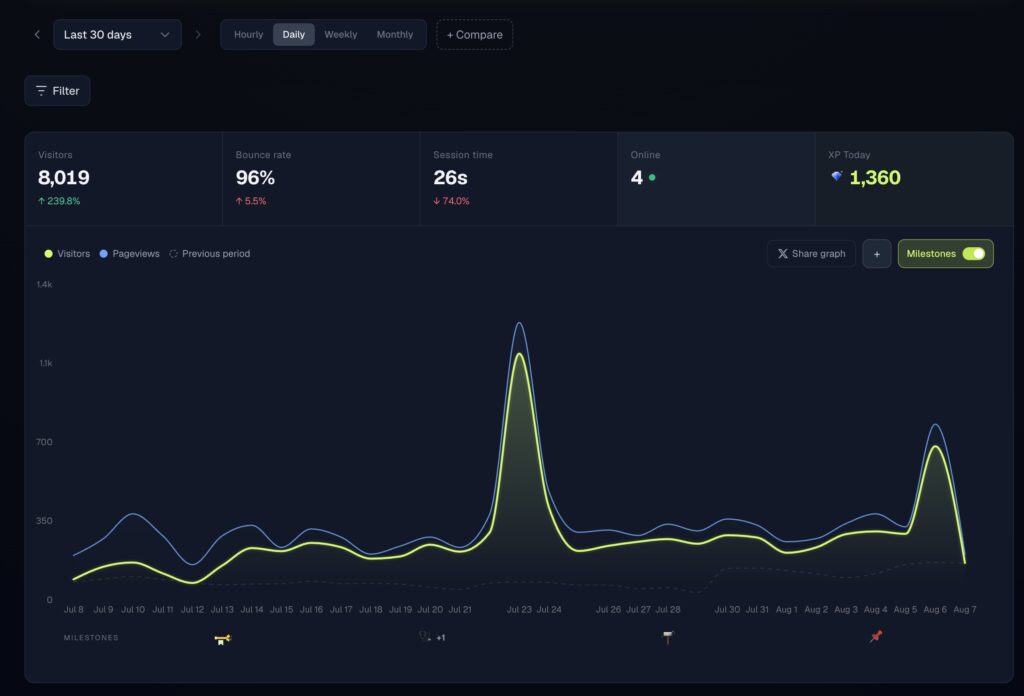
The parts I actually use daily: top pages and channels to see what’s working, and the bot view that separates AI crawlers like GPTBot from real visitors. Bot hits don’t count against your monthly events either.

- XP, levels, and 62 achievements across traffic, revenue, streaks, and geography, including Stripe-verified MRR milestones
- Cookieless by default, GDPR compliant, 1.4KB script
- Revenue and MRR tracking next to your traffic, not in a separate tool
- Live visitor map with a shareable public link
- Bot and AI crawler traffic shown separately (ChatGPT, Googlebot, GPTBot)

Pricing: starts at $7/mo for 10K monthly events, the Growth plan is $14/mo and adds GA4 import, 30 websites, and X mention tracking. Traffic tiers go up to 10M+ events. 14-day free trial, no card required, and yearly billing is 2 months free.
Pros: the cheapest paid entry on this list, revenue lives next to traffic, and the game layer means I actually open my analytics every day instead of once a month. Cons: it’s a young product from a solo founder (me), there’s no free tier beyond the trial, and if achievements and pixel characters annoy you, this is not your tool. Big teams that need session replays or heatmaps should look at Matomo or PostHog instead.

Pick XPmetric if you’re an indie maker who ships in public and wants checking analytics to feel like a reward instead of a chore.
5. Umami
Umami is the best free route into privacy-friendly analytics. It’s open source under the MIT license, and self-hosting it is free forever with unlimited sites and data.
- Free self-hosting with unlimited websites and events
- Cloud free tier with 100K events a month on 1 website
- Clean, modern dashboard with custom events and UTM reports
- Cookieless, GDPR and CCPA compliant
Pricing: self-hosted is free. Umami Cloud has a $0 Hobby tier (100K events, 6-month retention), and Pro is $20/mo with 1 million events included.
Pros: unbeatable price, active development, and the dashboard looks better than some paid tools. Cons: self-hosting means database maintenance is your problem, and the 6-month retention on the free cloud tier is tight for spotting yearly trends.
Pick Umami if you already run a VPS anyway. If that’s you, my post on running Claude Code on a VPS is probably up your alley too.
6. Simple Analytics
Simple Analytics does what the name says. It’s a Dutch company with a strong privacy stance, and the dashboard is one page you can read in ten seconds.
- One-page dashboard, no cookies, EU-based
- Free plan to get started (1 user, 1 month of history)
- Tweet and referral source enrichment
- Exports and API access on paid plans
Pricing: free plan with 1 month of data history, paid starts at $20/mo, with a 14-day trial and 2 months free on yearly billing.
Pros: radically simple, and the free plan is enough to test-drive it properly. Cons: $20/mo is on the pricey side for what it does, and extra team members cost $20/mo each.
Pick Simple Analytics if you want the least possible analytics with the strongest privacy story.
7. PostHog
PostHog is a different animal. It’s product analytics, so next to pageviews you get session replays, feature flags, A/B tests, and funnels. For a SaaS product, that’s gold. For a blog, it’s overkill.
- 1 million events free every month, forever
- Session replays, feature flags, and experiments in one platform
- Usage-based pricing after the free tier, with billing limits you control
- Open source core, self-hostable
Pricing: the first 1 million events per month are free, then it’s pay-as-you-go starting around $0.00005 per event. PostHog says more than 90% of companies use it for free.
Pros: the free tier is enormous, and no other tool here answers “why did users drop off in step 3”. Cons: the learning curve is real, and for simple website stats it’s like buying a truck to carry a sandwich.
Pick PostHog if you’re tracking a product, not a content site.
8. Cloudflare Web Analytics
Cloudflare Web Analytics is the “I just want a number” option. If your site is already behind Cloudflare, you can turn it on without touching your code.
- Completely free
- Privacy-first, no cross-site tracking
- Zero setup if you’re already on Cloudflare
Pricing: free.
Pros: free and frictionless. Cons: basic metrics only, short data history, and no goals, events, or revenue tracking. It answers “how many”, not “why”.
Pick Cloudflare Web Analytics if you’d otherwise run no analytics at all.
Comparison table
| Tool | Free tier | Starting price | Best for | Standout feature |
|---|---|---|---|---|
| Plausible | No (30-day trial) | $9/mo | Most people leaving GA4 | Simplest credible dashboard |
| Matomo | Self-hosted free | $29/mo cloud | Feature parity with GA4 | Heatmaps and session recordings |
| Fathom | No (7-day trial) | $15/mo | Long-term site owners | Forever data retention |
| XPmetric | No (14-day trial) | $7/mo | Indie makers building in public | XP, achievements, revenue tracking |
| Umami | Yes (100K events) | $20/mo Pro | Self-hosters and free seekers | Free unlimited self-hosting |
| Simple Analytics | Yes (limited) | $20/mo | Privacy purists | Radical simplicity |
| PostHog | Yes (1M events) | Usage-based | SaaS products | Session replays and flags |
| Cloudflare | Yes (fully free) | Free | Zero-budget basics | No-code setup on Cloudflare |
FAQ
Why are people looking for Google Analytics alternatives?
Three reasons come up again and again. GA4’s interface makes simple questions hard, EU sites need cookie consent banners for it, and the script adds weight to every page load. Privacy-first tools solve all three, usually for less money than the developer hours GA4 eats.
What is the best free Google Analytics alternative?
Umami, in my opinion. Self-hosting is free with no limits, and even the cloud free tier gives you 100K events a month. If you don’t want to host anything and your needs are basic, Cloudflare Web Analytics costs nothing and takes two minutes.
Do these tools need a cookie banner?
No. Every tool on this list works cookieless by default, so you don’t need a consent banner for the analytics itself. You may still need one if other parts of your site set cookies, like ads or embedded videos.
Can I import my Google Analytics data into an alternative?
Some tools support it. XPmetric and Fathom both offer GA4 imports, and Matomo can import historical data too. Check before your GA4 retention window expires, because Google only keeps detailed data for a limited time.
Which one should you pick?
If you just want GA4 out of your life with minimal thinking, take Plausible. If you need every feature GA4 had, take Matomo. If you’re broke or love running your own stuff, take Umami. And if you’re an indie hacker who wants analytics that are actually fun to open, try XPmetric. That last one pays my server bills, so test it on the 14-day trial and make up your own mind.
Whatever you pick, also make sure your site itself is fast. My guide on WordPress performance covers the easy wins. And if you decide to stay with Google after all, at least set it up cleanly, like in my Astro Google Analytics integration guide.
