Claude Custom Instructions: The 10-Line File That Kills Walls of Text
 By Updated 6 min read
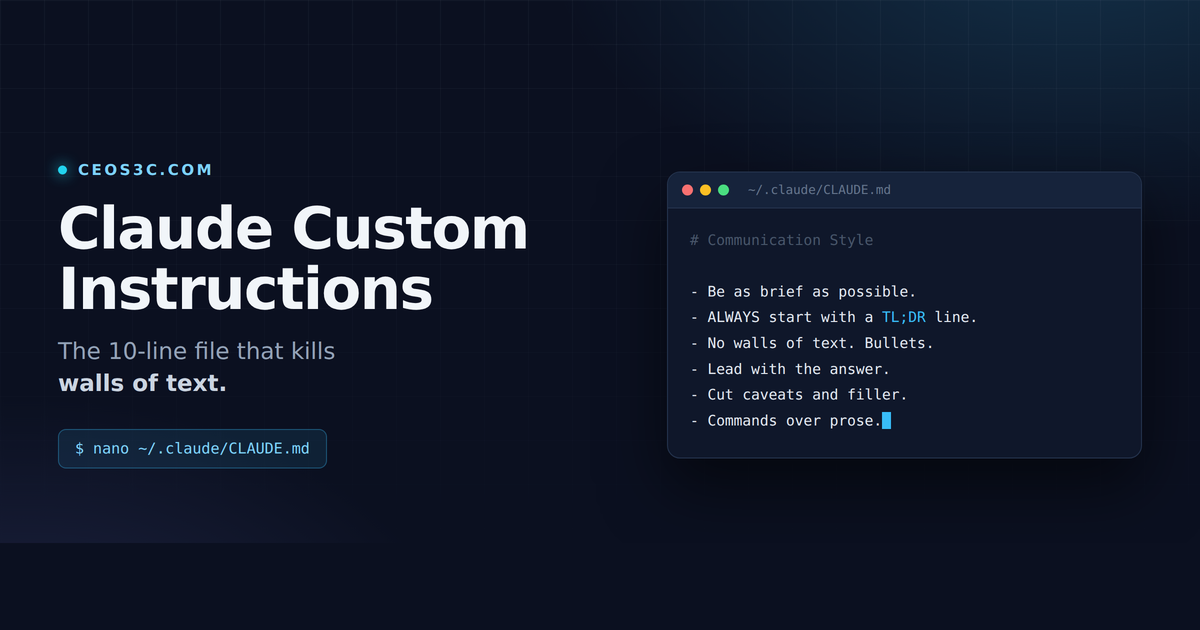
Claude gives me great answers. It just buries them under 400 words of preamble, restatement, and caveats I didn’t ask for, and I have ADHD, so that version of “helpful” is useless to me.
I fixed it permanently with a short config file. Below is the exact ruleset, where to put it for the CLI and for the desktop app, and why each line does what it does.
Table of Contents
TL;DR / Quick Version
Create this file:
mkdir -p ~/.claude
nano ~/.claude/CLAUDE.md
Paste this in:
# Communication Style

- I have ADHD and struggle with concentration. Be as brief as possible.
- ALWAYS start every response with a **TL;DR** line: one or two sentences, the
  answer itself, not a summary of what you're about to say.
- No walls of text. Short paragraphs, bullets, whitespace.
- Lead with the answer. Skip preamble, restating my question, and "great
  question" style filler.
- Cut caveats and disclaimers unless they change what I should actually do.
- If something requires depth, say so explicitly ("this needs detail because
  X"), then give the detail, structured with headers and bullets.
- Code and commands over prose explanations. Show me the diff or the command,
  don't describe it.
- When you finish a task, report what changed in 1-3 bullets. Don't narrate
  every step.
- If there are 3+ viable approaches, give me your recommendation first,
  alternatives after.
Start a new session. Done. Everything below is the why and the edge cases.
The problem: models are trained to pad
Chat models get rewarded for answers that look thorough. So you ask “how do I check which process is on port 3000” and you get a paragraph acknowledging what a good question that is, a paragraph explaining what ports are, three methods you didn’t need, and a closing note about how results may vary by distribution.
The command was lsof -i :3000. That’s it. Everything else was tax.
This gets worse the more you use Claude for actual work. In a coding session you’re scanning for one command or one diff, and the model is writing you an essay. Longer is not more correct, it’s just more to read. And when you have to re-read a response three times to find the one line that mattered, the tool is costing you focus instead of saving it.
The fix is not better prompting every single time. The fix is telling Claude once, permanently, in a file it reads at the start of every session.
Where to put your Claude custom instructions
Two places, depending on which Claude you’re using. Set both if you use both.
Claude Code (CLI): ~/.claude/CLAUDE.md
Claude Code reads memory files at the start of every session. The user-level one lives at ~/.claude/CLAUDE.md and applies to every project on your machine, no matter which directory you launch from.
mkdir -p ~/.claude
touch ~/.claude/CLAUDE.md
Then open it in whatever editor you like and paste the ruleset. If you’d rather do it from inside Claude Code, run /memory and pick the user-level entry. It creates the file if it doesn’t exist yet and opens it in your editor.
To confirm it actually loaded, run /context in a session and look under Memory files. If your file isn’t in that list, Claude never saw it.
Claude desktop and web app: Settings, General, Instructions for Claude
The chat apps have their own equivalent. Open Settings, go to General, scroll to the Profile section, and paste the same ruleset into the Instructions for Claude box.
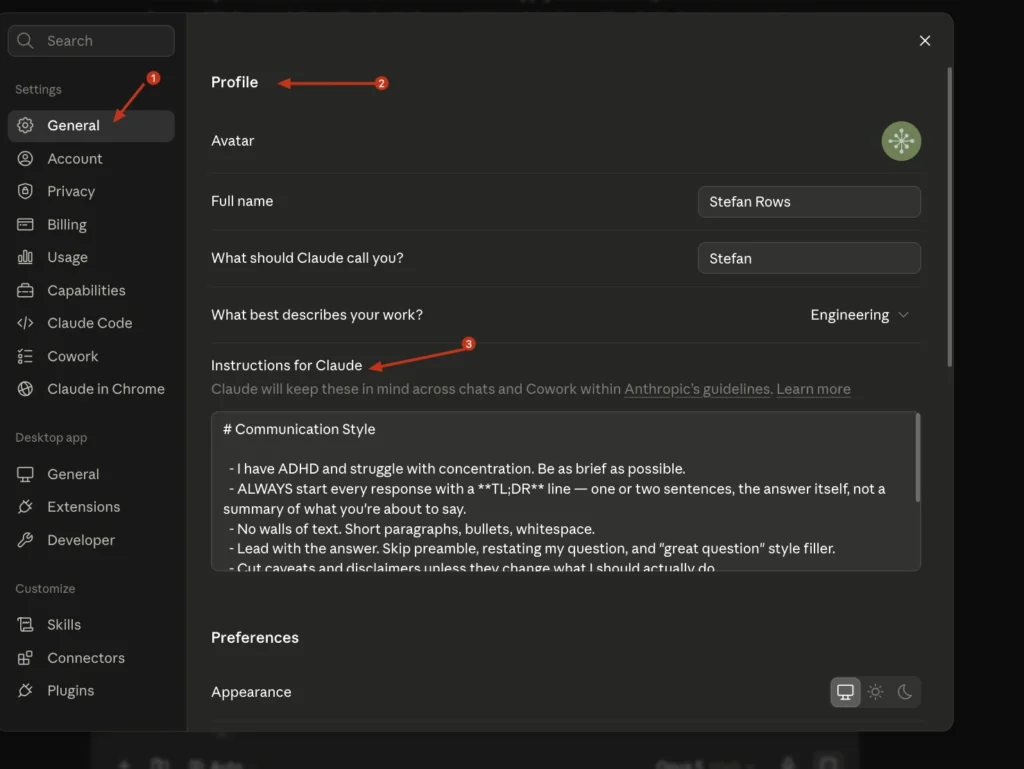
It applies to every new conversation on your account, across desktop, web, and mobile, and Claude carries it into Cowork sessions too. Same file contents as the CLI version, no changes needed.
If you want brevity in some chats but not others, use Custom Styles instead. Styles are per-conversation, so you can keep a “Terse” style for daily work and switch to something longer for writing tasks. The Instructions for Claude box is the always-on default. Styles are the switch.
One thing worth knowing: Project instructions in the web app stack on top of your profile instructions. If a Project tells Claude to write long-form articles, that’s going to fight your “be brief” rule inside that Project. That’s usually what you want, but it explains why one Project ignores your terse setting while every other chat respects it.
Why each rule works
- “I have ADHD and struggle with concentration.” Giving a reason works better than an order. The model has a model of what brevity for a distractible reader looks like, and that’s more useful than the abstract instruction “be short”.
- The TL;DR rule. This is the biggest win by far. It forces the answer into the first line, before the model has a chance to warm up. Even when the rest of the response drifts long, you already have what you came for. If you only adopt one rule, adopt this one.
- “No walls of text.” Targets formatting, not length. A 300-word answer with whitespace is scannable. A 150-word paragraph block is not.
- “Lead with the answer.” Kills the restate-the-question opener, which is pure token spend and tells you nothing.
- “Cut caveats unless they change what I should actually do.” The key word is unless. A blanket “no disclaimers” gets you confidently wrong answers. This version keeps the caveats that matter and drops “results may vary”.
- “If something requires depth, say so explicitly.” The escape hatch. Without it, the model will compress a truly complicated answer into something wrong. With it, you get a flag first, then the long version.
- “Code and commands over prose.” Stops the “you’ll want to modify the config file to enable that option” answer. Show me the line.
- “Report what changed in 1-3 bullets.” For agentic work this is huge. Claude Code will otherwise narrate every file it touched.
- “Recommendation first, alternatives after.” Turns a menu into a decision. You can still read the alternatives if you disagree.
Before and after
Same question: “How do I see which process is using port 3000?”
Before:
Roughly 250 more words follow before the actual command shows up.
After:
Same information. One of them I can read in two seconds.
Gotchas
Changes apply on the next session, not the current one. CLAUDE.md is read at session start. Edit it mid-session and nothing happens. Exit, start a new session, run /context to verify.
Project-level CLAUDE.md stacks on top of the global one. A ./CLAUDE.md in your repo does not replace ~/.claude/CLAUDE.md, both load, with the project file read last. If a project file says “explain your reasoning in detail”, it’s going to pull against your global brevity rule. Keep them compatible or you’ll get inconsistent behavior.
Keep it short. Everything in CLAUDE.md is loaded into context on every single session. Anthropic’s own guidance is to stay under 200 lines, and shorter files get followed more reliably than long ones. A bloated instructions file makes Claude worse at following instructions, which is a fun kind of irony.
It’s guidance, not enforcement. CLAUDE.md is context, not a hard rule. Claude will follow it most of the time and occasionally drift, especially in long sessions after a compaction. That’s normal.
Customizing it for yourself
Don’t copy my ADHD line if it isn’t true for you. Swap in your own reason, because the reason is doing real work here. “I read on a phone.” “I’m reviewing 40 of these a day.” “I’m a senior dev, skip the basics.” Any of those steer the output.
Treat the file as living. Every time you catch yourself typing the same correction into chat for the second time, that correction belongs in CLAUDE.md. Mine started as three lines and grew to nine over a few weeks, and I’ve deleted rules that turned out to be redundant.
Also worth pairing this with the rest of your setup. If you’re running Claude Code on a server, the same file applies there, see my guide on how to run Claude Code on a VPS. And if you want it doing real work unattended, my Codex plus Claude Code git automation setup leans hard on the “report what changed in 1-3 bullets” rule.
The official reference for all of this is the Claude Code memory documentation, which covers the enterprise and rules-directory options I skipped here.
Your turn
What’s in your instructions file? I’m collecting the good ones. Hit me up on X (@StefanRows) with the rule that made the biggest difference for you, I’ll steal the good ones and update this post.
More posts
All Linux