Metasploit failed to connect to the Database: FIXED
 3 min read

To fix Metasploit failed to connect to the database, start PostgreSQL with sudo msfdb start, confirm it listens on port 5432 with sudo ss -lntp | grep post, then run sudo msfdb init. Check the result with db_status inside msfconsole. If PostgreSQL sits on port 5433, change it to 5432.
Short version
sudo msfdb start
sudo ss -lntp | grep post
sudo msfdb init
msfconsole -q
Then run db_status at the msf6 > prompt. It should say you are connected to msf. If ss shows port 5433, follow step 2 below.
Welcome back, fellow hackers! I recently had the Metasploit fail to connect to the Database on the ParrotSec OS version 4.2.2 at the time. I use multiple instances of ParrotSec, and I had the exact same issue on all of them. I don’t know if that is a thing on Kali Linux as well, but for ParrotSec, the reason this happens is that PostgreSQL is not listening on port 5432, which Metasploit requires, but on port 5433. If you don’t fix this, the search function of Metasploit will take a very long to show results.
So what we need to do is, change the port on PostgreSQL. I’ll show you how to do that.
Table of Contents
- Short version
- Step 1 - Starting and Checking PostgreSQL
- Step 2 - Updating the PostgreSQL config
- Step 3 - Restarting PostgreSQL and re-initialize the Metasploit Database
- FAQ
- Why does Metasploit say it failed to connect to the database?
- Which port does Metasploit use for PostgreSQL?
- How do I check that the database is connected?
- Does msfdb reinit delete my data?
Step 1 - Starting and Checking PostgreSQL
First, we need to make sure PostgreSQL is running.
sudo msfdb startNext, we are going to check which port PostgreSQL is using.
sudo ss -lntp | grep post
Now I already fixed it for my OS, but if you see port 5433 here instead of 5432, you know that you have the error I described above. Now we are going to fix that.
You can also list all installed PostgreSQL clusters and their ports with pg_lsclusters. If two versions are installed, only one of them can use port 5432, so stop or remove the one you do not need.
Step 2 - Updating the PostgreSQL config
First, run the following command to double-check the port that is being used in the config right now.
Make sure you adjust the PostgreSQL version to the actual installed version. So after typing /etc/postgresql/ hit the TAB button to see your installed version. The screenshots and commands below use version 10, which was current back then. Newer Kali and Parrot releases ship a newer number, so swap it in.
sudo grep "port =" /etc/postgresql/10/main/postgresql.conf
You will probably see port = 5433 here now. As I said, I already fixed it for myself.
Now we are going to change that in the config.
You can either go ahead and use nano to edit the file:
sudo nano /etc/postgresql/10/main/postgresql.confFind the entry for port = 5433 and change it to 5432, hit CTRL+O to save and CTRL + X to leave, or you can just run the following command:
sudo sed -i 's/\(port = \)5433/\15432/' /etc/postgresql/10/main/postgresql.confAs I said above, make sure you adjust the PostgreSQL version to the one you have installed (after /etc/postgresql/YOURVERSIONHERE).
Step 3 - Restarting PostgreSQL and re-initialize the Metasploit Database
As the last step, we need to restart PostgreSQL and re-initialize our Metasploit Database.
sudo service postgresql restart
sudo msfdb init
The screenshot below shows only the restart, from the original Parrot release.
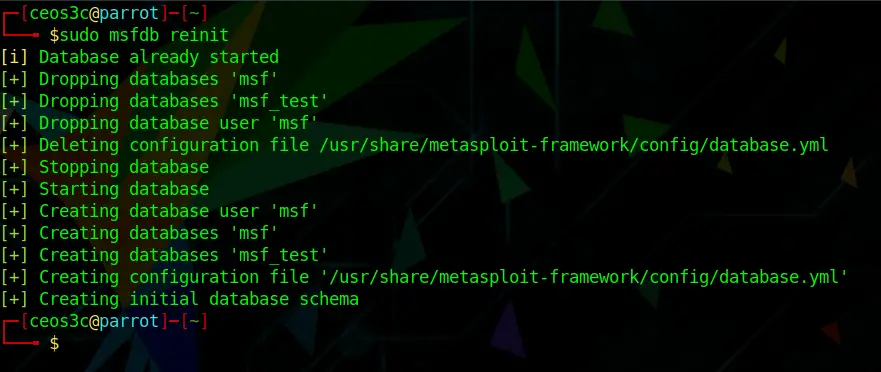
Now start msfconsole and run db_status. You should see that it is connected to msf.
If PostgreSQL has to stay on port 5433 for some reason, you can tell msfdb about it instead: PGPORT=5433 msfdb init, as the Kali docs show.
After you have followed all of those steps, you should have solved the Metasploit Failed to connect to the Database error. Let me know in the comments below if that worked out for you. Want to learn more about Metasploit? Check out my other tutorials.
FAQ
Why does Metasploit say it failed to connect to the database?
Usually PostgreSQL is not running, the Metasploit database was never initialized, or PostgreSQL listens on a different port than 5432. Run sudo msfdb start, check the port with sudo msfdb status, then run sudo msfdb init.
Which port does Metasploit use for PostgreSQL?
Port 5432, the PostgreSQL default. If your cluster listens on another port, either change it back to 5432 or point msfdb at the right one with the PGPORT variable.
How do I check that the database is connected?
Start msfconsole and run db_status. A working setup answers with Connected to msf. Connection type: postgresql. You can also run sudo msfdb status outside the console.
Does msfdb reinit delete my data?
Yes. msfdb reinit deletes the Metasploit database and creates it again, so you lose stored hosts, loot and workspaces. Try sudo msfdb init first and only reinitialize if you have nothing to lose.
2 thoughts on “Metasploit failed to connect to the Database: FIXED”
Comments are closed. I keep the discussion here because the answers still help.
More posts
All Cyber Security


thank you fixed it!
thank you, helped