Astro Tailwind – Complete Astro JS Tailwind Guide
 By Updated 2 min read

In this Astro Tailwind Guide, we will show you how to install Tailwind in your Astro project and which VS Code extensions for Astro we recommend for the best possible development experience.
Table of Contents
How do I add Tailwind to Astro?
There are two ways of installing Tailwind for your Astro project: Quick Install and Manual Install. The easiest way to install Tailwind in Astro is by using Quick Install since all config files are created and updated automatically for you. Therefore, we recommend using the Quick Install method whenever possible.
If you need help setting up VS Code for Astro development, please follow this article.
Astro Tailwind Quick Install
To install Tailwind in your Astro project using Quick Install, run the following command:
# For NPM
npx astro add tailwind

# For Yarn
yarn astro add tailwind

# For PNPM
pnpm astro add tailwind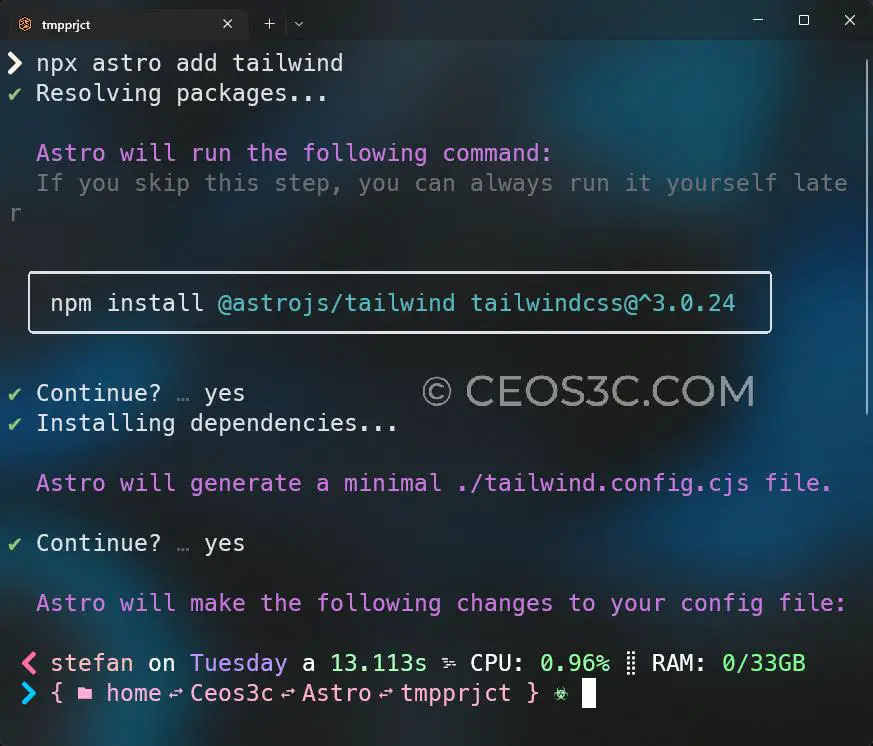
Astro Tailwind Manual Install
To use the Manual Install method, follow the steps below:
npm install @astrojs/tailwind tailwindcssThen, add the following code to your astro.config.mjs file:
import { defineConfig } from 'astro/config';
import tailwind from '@astrojs/tailwind';

export default defineConfig({
  // ...
  integrations: [tailwind()],
});
Astro Tailwind VS Code Extensions
For a better development experience with Astro and Tailwind CSS, we recommend using the following VS Code extensions:
- The official Astro VS Code extension.
- The official Tailwind CSS VS Code extension.
- The Headwind VS Code extension. (Optional)
While the first two extensions are mandatory, in our opinion, the Headwind VS Code extension is optional. It is an opinionated extension that automatically sorts your Tailwind CSS class tags, which can greatly help to keep organized when working with a lot of Tailwind CSS classes.
Why is Tailwind so Popular?
Tailwind CSS is a popular CSS framework because it offers a unique approach to styling web pages. Rather than providing a set of pre-designed components, Tailwind CSS provides a set of low-level utility classes that let developers quickly and easily style elements on a page without having to write custom CSS.
This makes it easy for developers to create custom, responsive designs without having to spend a lot of time writing CSS. Additionally, Tailwind CSS is highly customizable, so developers can create their own designs using the framework’s utility classes.
Is Learning Tailwind Hard?
The difficulty of learning Tailwind CSS will depend on the individual learner and their experience with CSS and web development. If you are new to CSS and web development, there may be a learning curve as you become familiar with the concepts and terminology used in Tailwind CSS.
However, if you have experience with CSS and web development, learning Tailwind CSS may not be as difficult. Like any new technology, learning Tailwind CSS will take time and practice, but many people find that it is a powerful and useful tool for styling web pages.
Stefan
Stefan founded Ceos3c in 2016 and has spent a decade teaching cybersecurity, Linux, and web development through hands-on tutorials. He builds and ships real products while sharing his journey: ProofSwap.me, XPMetric.com, and EasyEarningsTracker.com. Find him on YouTube (youtube.com/stefanrows) and X (@StefanRows).
- ProofSwap Testimonial swaps for indie makers
- xpmetric Cookieless web analytics
- EasyEarningsTracker Income tracking for creators
More posts
All Web Development