
Disclosure: AI Coding Orchestrator is a tool my friend and I built for ourselves. It isn’t publicly available right now.
I run five or six projects at the same time, and something is almost always being built by an agent. That only works because I stopped keeping my plans in Markdown files nobody reads.
Friends who work with me kept asking how I actually do this, so here’s the whole AI coding workflow: how I plan work for AI agents, hand it off tier by tier, and always know what’s done. At the end, an agent builds a small app from an empty folder for about 1% of my weekly usage.
TL;DR: the workflow in 4 steps
- Plan with a strong model. Have it split the feature into tiers (one branch and one PR each) and small steps, and save that roadmap to a board instead of an
.mdfile. - One fresh chat per tier. Copy the board’s “continue” prompt into a new chat. The agent reads the board over MCP, claims the task and works it.
- Plan and review with the expensive model, build with cheap subagents. An execution profile appended to the prompt tells the agent exactly that.
- Let the board keep score. Agents set status, claim tasks and write a log line, so you, your collaborators and the next agent all know where things stand.
Where it started: a Notion roadmap template
For about a year I worked with a Notion template I built. It creates a tiered list of tasks plus instructions, so an agent can create and work roadmaps through the Notion MCP server. Every task has a complete prompt you can paste into any AI agent.
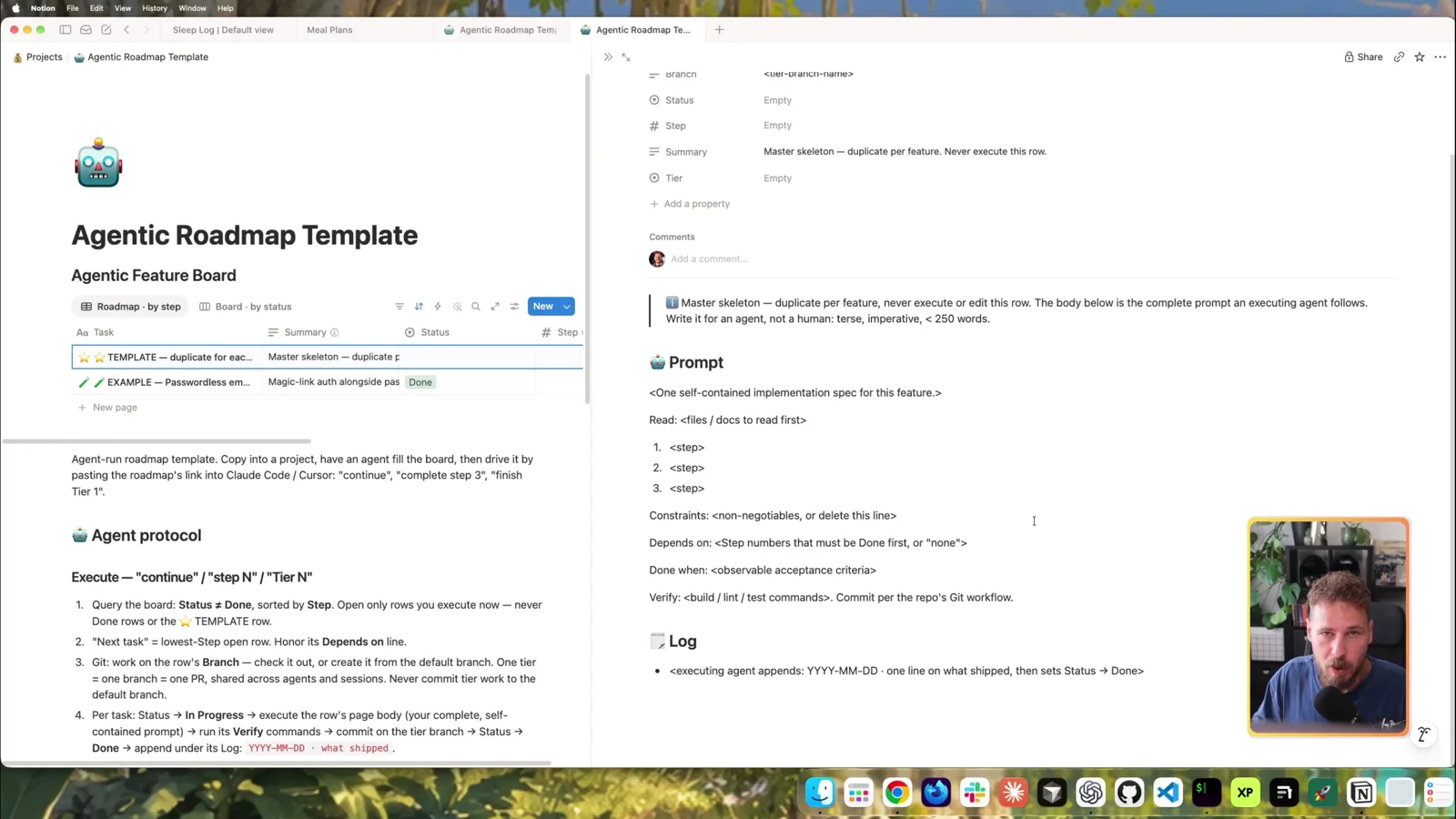
The core idea still holds: use a good model to plan an entire roadmap, then execute it with a cheaper one.
The other reason I built it: I don’t read Markdown files that live in the repo. With plans scattered across .md files I was constantly confused about the current state and kept asking agents “what should we work on next?” I wanted one overview: what’s done, what’s open, what’s next.
Why we built our own tool
Then I started building a game with a friend, and Notion hit its limits fast:
- Collaboration on the free plan: our shared project quickly outgrew what the free plan allows.
- MCP overhead: even when you only paste a roadmap link and say “continue”, the Notion MCP server sends a lot of extra HTML templating. That burns far more tokens than the task needs.
So we built our own agentic roadmap tool, made for speed and collaboration, with as little overhead as possible. It runs on a VPS and updates live: you watch tasks appear and change status while the agent works.
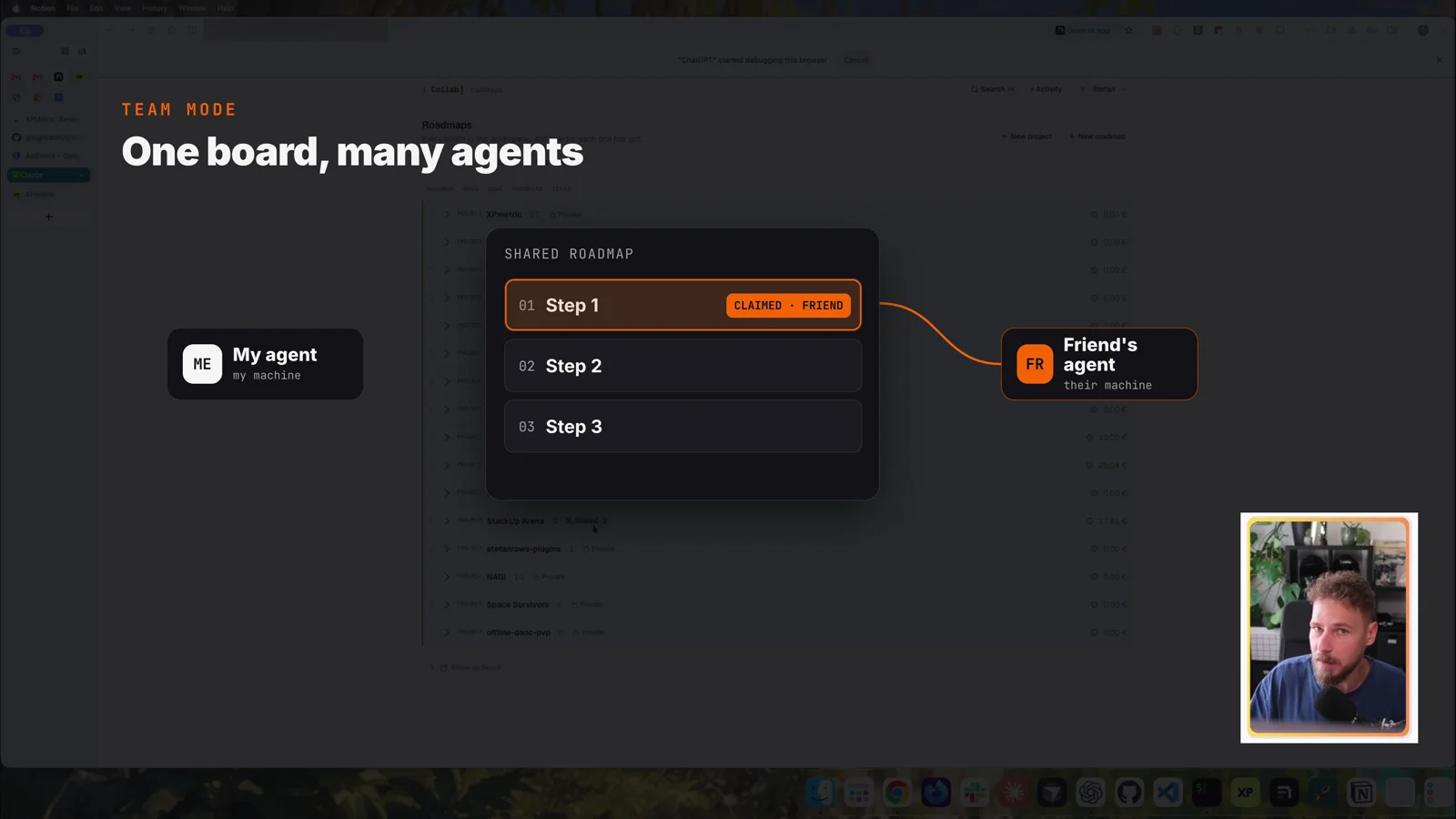
The collaboration part is the big one. Roadmaps can be shared with a team. When my friend’s agent starts a tier, it claims the task immediately. My agent sees the claim and won’t touch that task, even if my friend and I aren’t talking at that moment.
A quick tour of the board
The roadmaps view shows every board with its progress at a glance: what’s done, what’s open, what’s blocked. Blue means in progress, yellow means blocked.
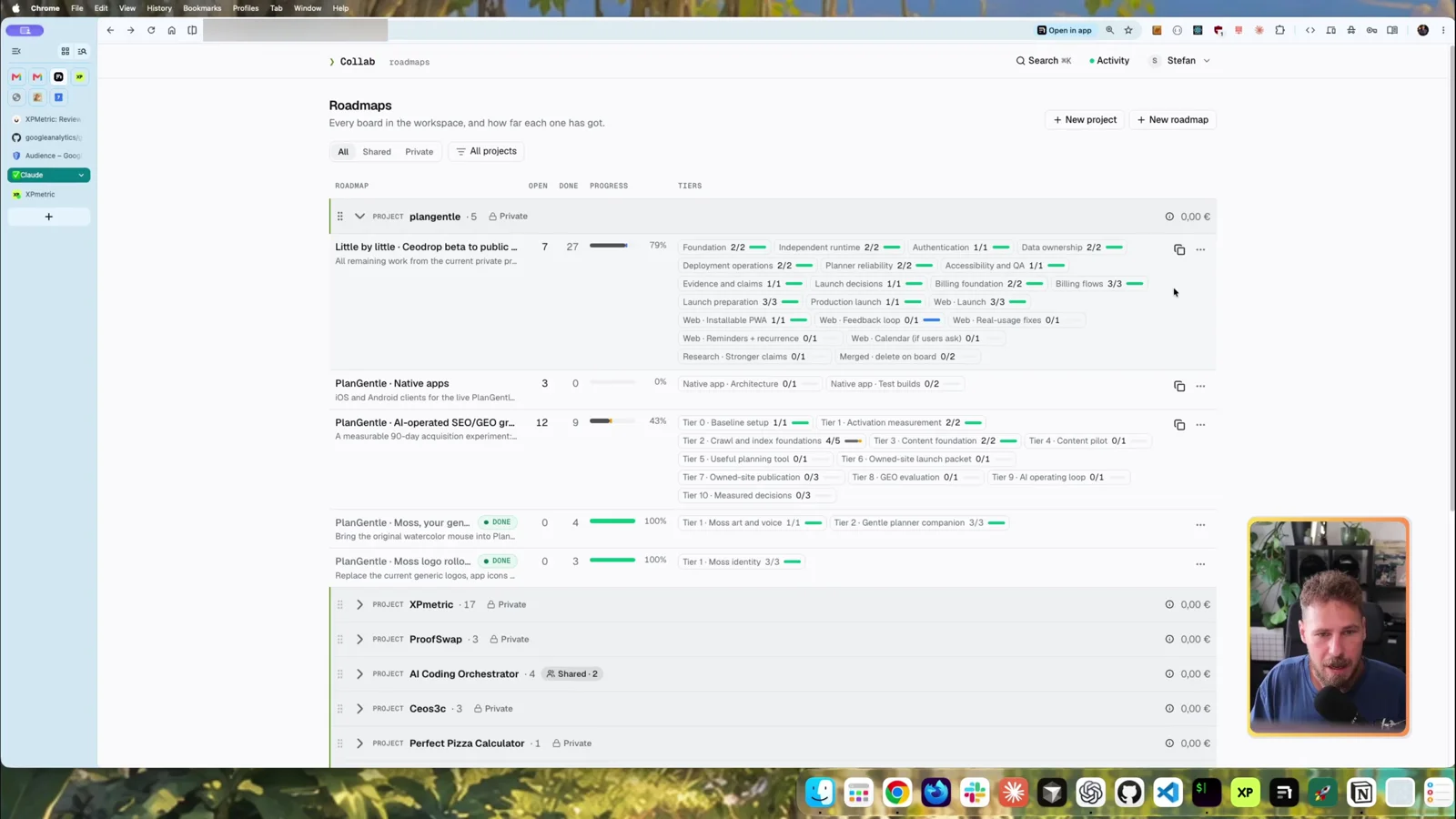
Each roadmap has a copy button that gives you a ready-made prompt to continue the work. This is the one I set up for the demo (server address removed):
Use the AI Coding Orchestrator MCP server at <your-server>/mcp (bearer token from Settings → API tokens; ask if missing). Do all board work through it; its server instructions contain the protocol. Roadmap little-by-little-launch: complete the next open Tier — every open task, starting at Step 28 on branch feat/feedback-loop, one PR.Code language: PHP (php)Inside a roadmap you can switch between a flat view and grouping by tier, filter open vs. all tasks, and hit Cmd+K to jump to any roadmap or task. Everything you can do there, archiving and deleting included, your agent can do too.
Demo: planning a feature from an empty folder
For the demo I used the ChatGPT app in Work mode (Codex) with GPT-6.1 Sol on high. Since the board is an MCP server, it works the same in Cursor, Grok or Claude Code.
I created an empty folder called ACODemo and sent this prompt:
Plan a roadmap for "Focus Desk", a single-page personal focus dashboard.
Design: dark background, oversized typography, lime accents, a circular focus timer, and a clean list of today's tasks. Make it visually polished enough for a live video demo.
Split the work into three small stages:
  1. Dashboard design with sample content.
  2. Working timer and editable task list.
  3. Completion animation, session counter, and persistence in the browser.
Include a 10-second demo timer. No accounts, backend, or external APIs. Show me the proposed roadmap before saving it in AI Coding Orchestrator.Code language: PHP (php)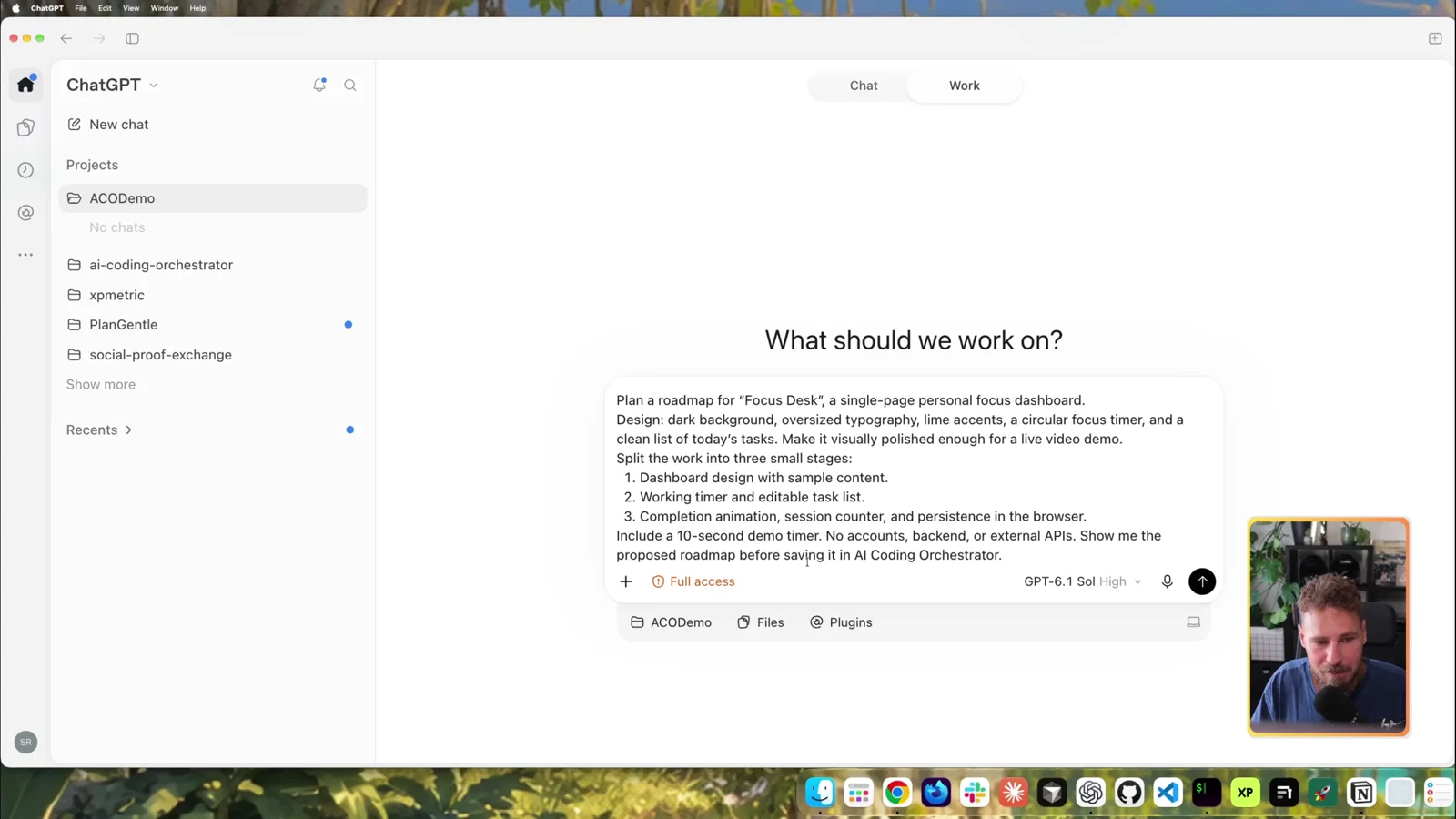
The project knew nothing about the orchestrator. The connected MCP server was enough for the agent to work out where the roadmap should go.
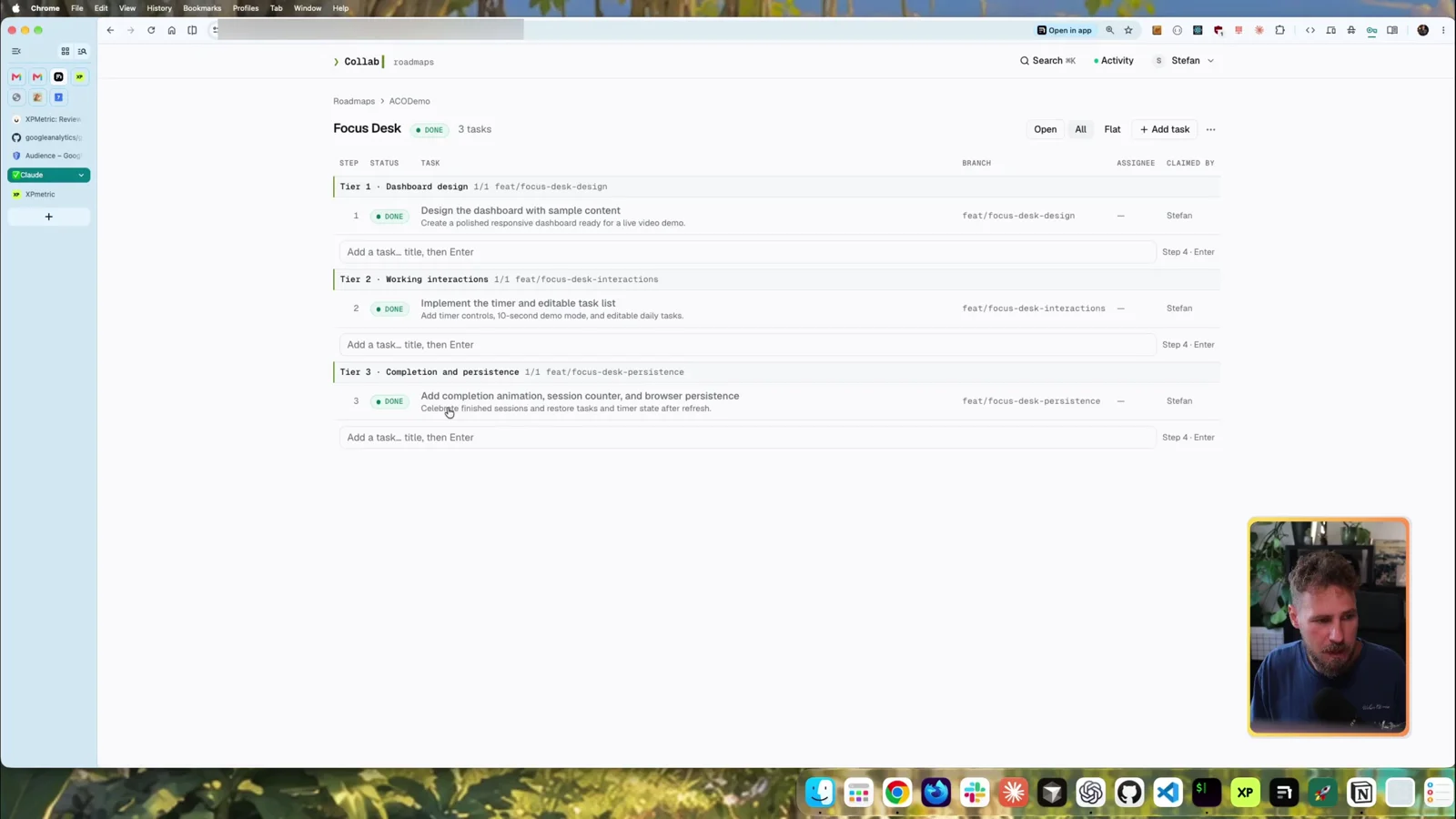
I don’t read the proposal in chat (I hate walls of text). I just say “put the roadmap into ACO” and read the steps on the board instead. While Sol was still thinking, the project showed up live with three tiers, one task each:
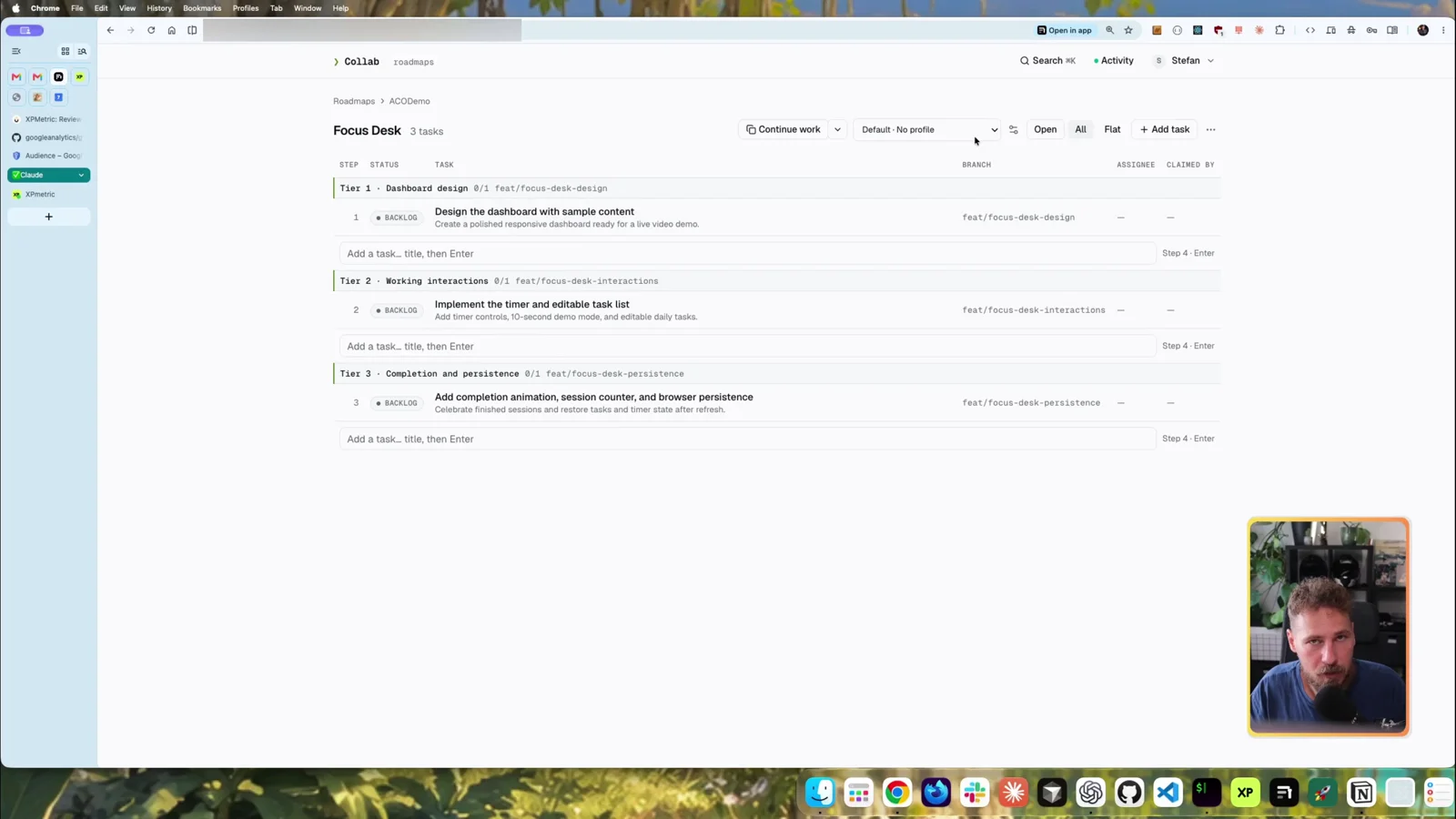
Spotted a bug or an idea? Type it in the “Add a task” row under a tier and hit Enter. It’s added to that tier immediately.
Copying a tier prompt: pick how much work one chat takes
This is where it gets useful. Instead of a single “continue” button, you choose how much one prompt should cover:
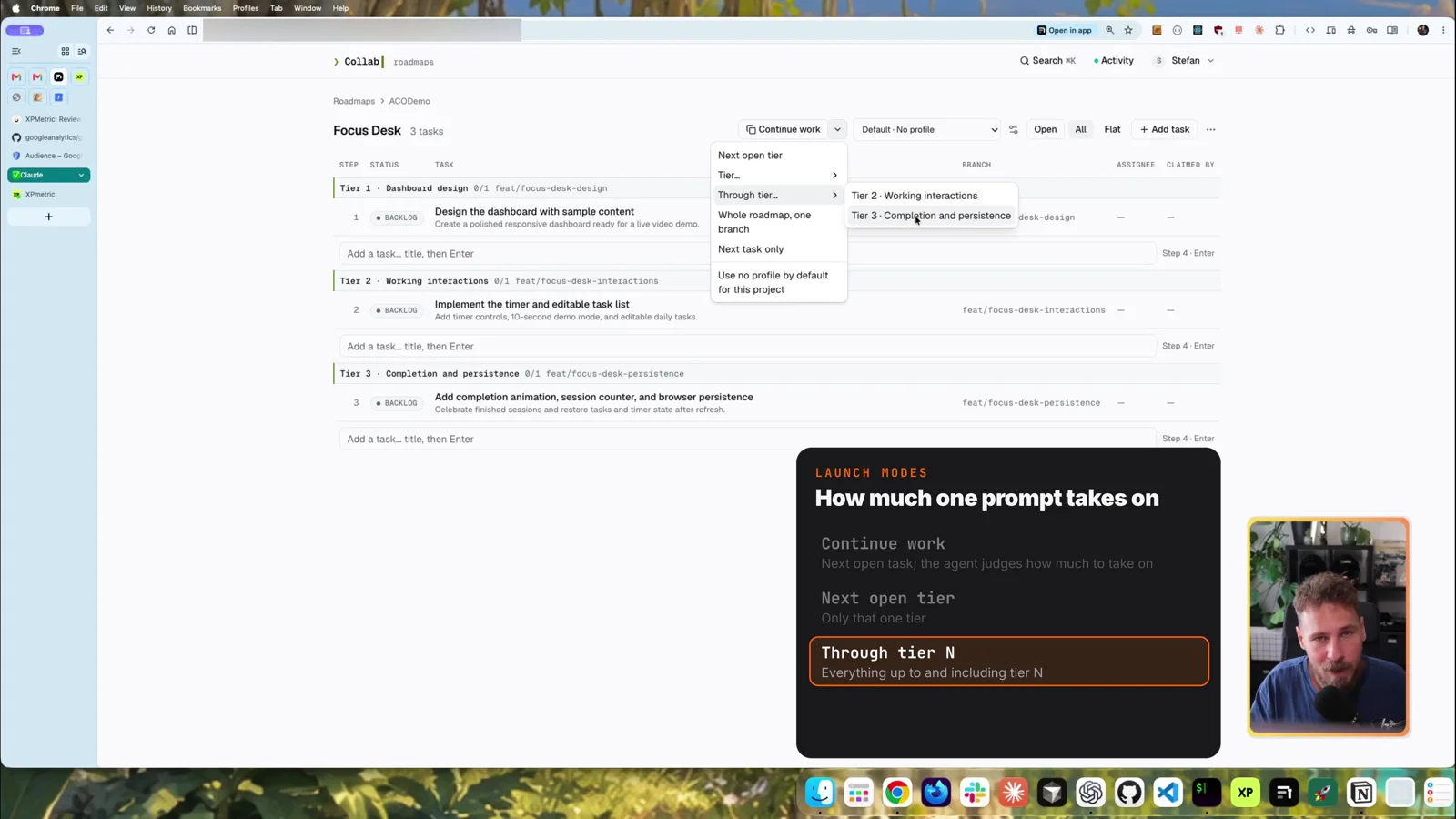
- Continue work: the agent decides how much to take on. If a tier has several steps, it may do the whole tier in one go.
- Next open tier: exactly one tier, nothing more.
- A specific tier: pick the tier yourself.
- Through tier N: everything up to and including that tier. “Through tier 3” on a 3-tier board means the whole roadmap.
- Whole roadmap, one branch: all of it in one go.
- Next task only.
Each task also shows its prompt body (what actually gets sent to the agent), who it’s assigned to, who claimed it, the branch, and a live activity feed.
Execution profiles: plan and review with the big model, build with cheap subagents
This is the newest feature. I only added it a few days before recording.
Without a profile, the copied prompt just says “continue”. The agent does everything with your main model, which is slow and expensive on bigger tiers. With a profile selected, the same prompt gets an execution profile appended. This is the Codex · Efficient implementation profile I used:
Execution profile: Codex · Efficient implementation (Codex).
Main session / planning preference: gpt-6.1-sol (high effort). Plan the work before implementation.
Use the current main session. If its active model or effort is not exposed to you, proceed with planning and implementation without asking the user to confirm those settings. Missing visibility is not a mismatch and must not block work. Do not claim to have inspected or changed settings you cannot observe.
Delegate implementation to subagents using gpt-6-luna (max effort). Parallelize only independent work; respect the roadmap's dependencies and shared branch.
Final review: you, the main agent in the current session, review the implementation and verification results before finishing.
Apply the requested subagent models and efforts explicitly through the available launch controls. Only if those controls or a tool error show that a requested setting or capability is unsupported, or exposed main-session settings show an actual mismatch, explain the specific conflict and ask before substituting. Do not claim a setting was applied unless it was actually configured.Code language: PHP (php)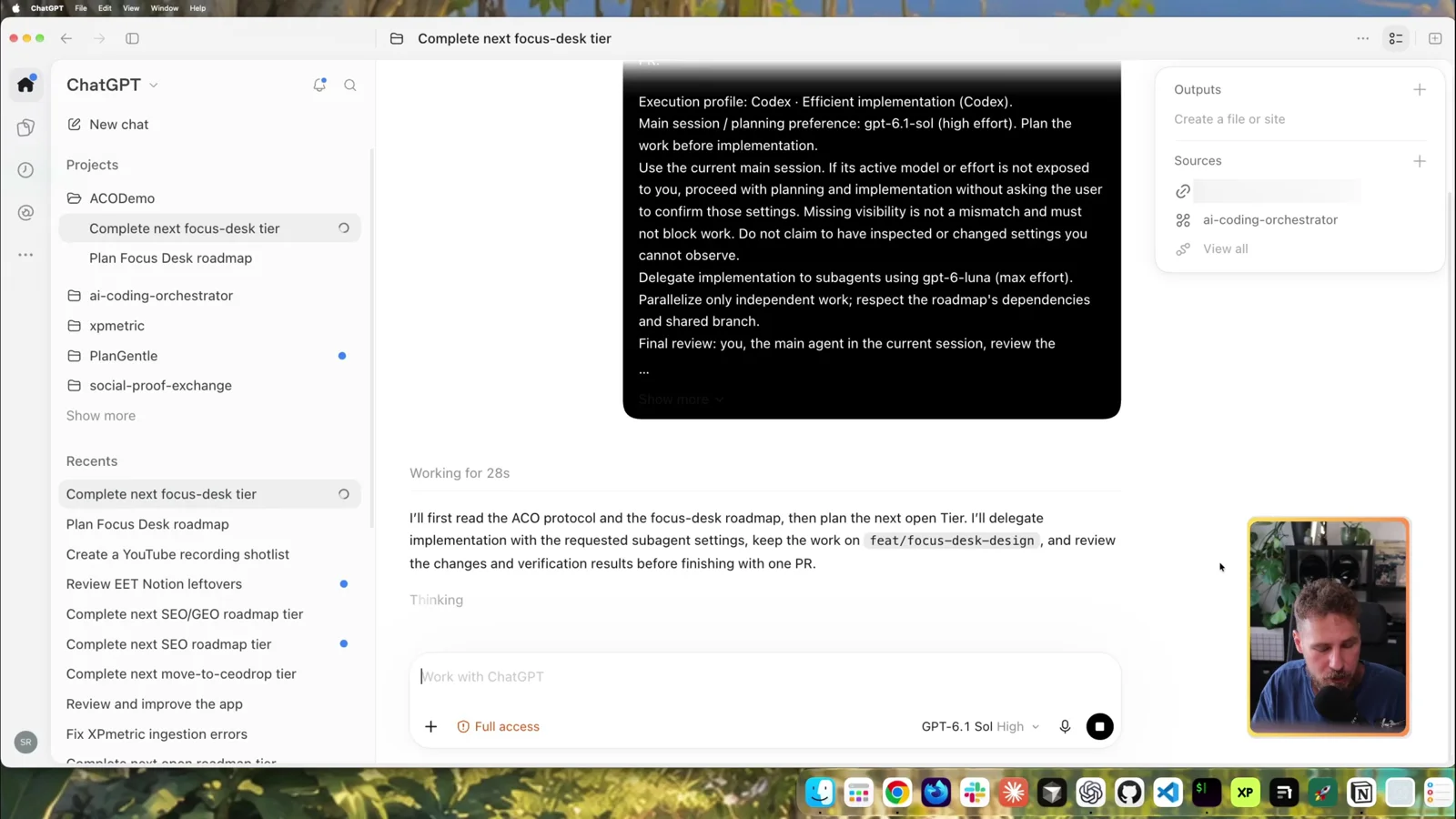
The good model only plans and reviews. GPT-6 Luna subagents at max effort do the implementation, and they turned out to be really good. Since I started working this way I’ve gotten an incredible amount of work done while barely spending tokens.
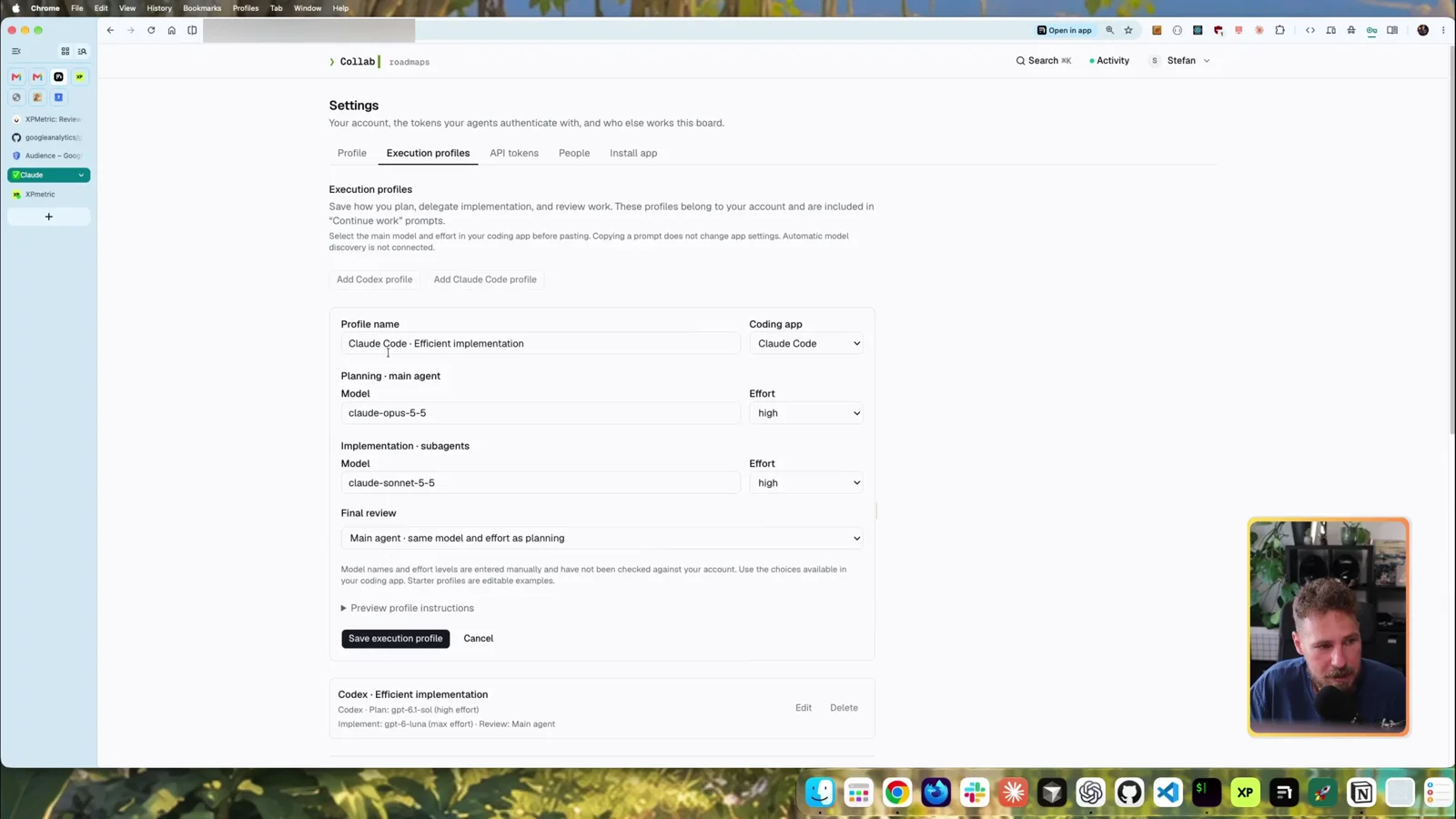
You set profiles per project under Settings → Execution profiles. A Claude profile works the same way: Claude Code as the coding app, Claude Opus 5.5 to plan, Sonnet subagents to implement, and a final reviewer of your choice.
Agents working the roadmap
With the profile set to Codex, I clicked Continue work and pasted the prompt into a fresh chat. The agent:
- Read the board over MCP and created the tier’s branch
- Asked which GitHub repository should receive the PR. This was a demo, so I told it to merge into the local
main - Spawned a GPT-6 Luna (max) subagent for the implementation
- Set the task to in progress and claimed it. The board showed that one of my agents held it
- Tested the page in Codex’s in-app browser, including mobile, then marked the task done with a log line
That log matters. Every later agent reads the task history before it starts, so nothing gets lost between chats.
For the rest I used Through tier 3 in another new chat. Tier 2 finished, tier 3 moved to in progress on its own, and the main model reviewed the subagents’ work at the end.
The usage: I started the demo with 78% of my weekly usage left on my $100 plan and finished with 77%. The whole app took 1%.
The reason is the structure: every tier gets its own fresh chat, so context stays small. Long chats get expensive because the whole context is sent again with every turn.
The finished app
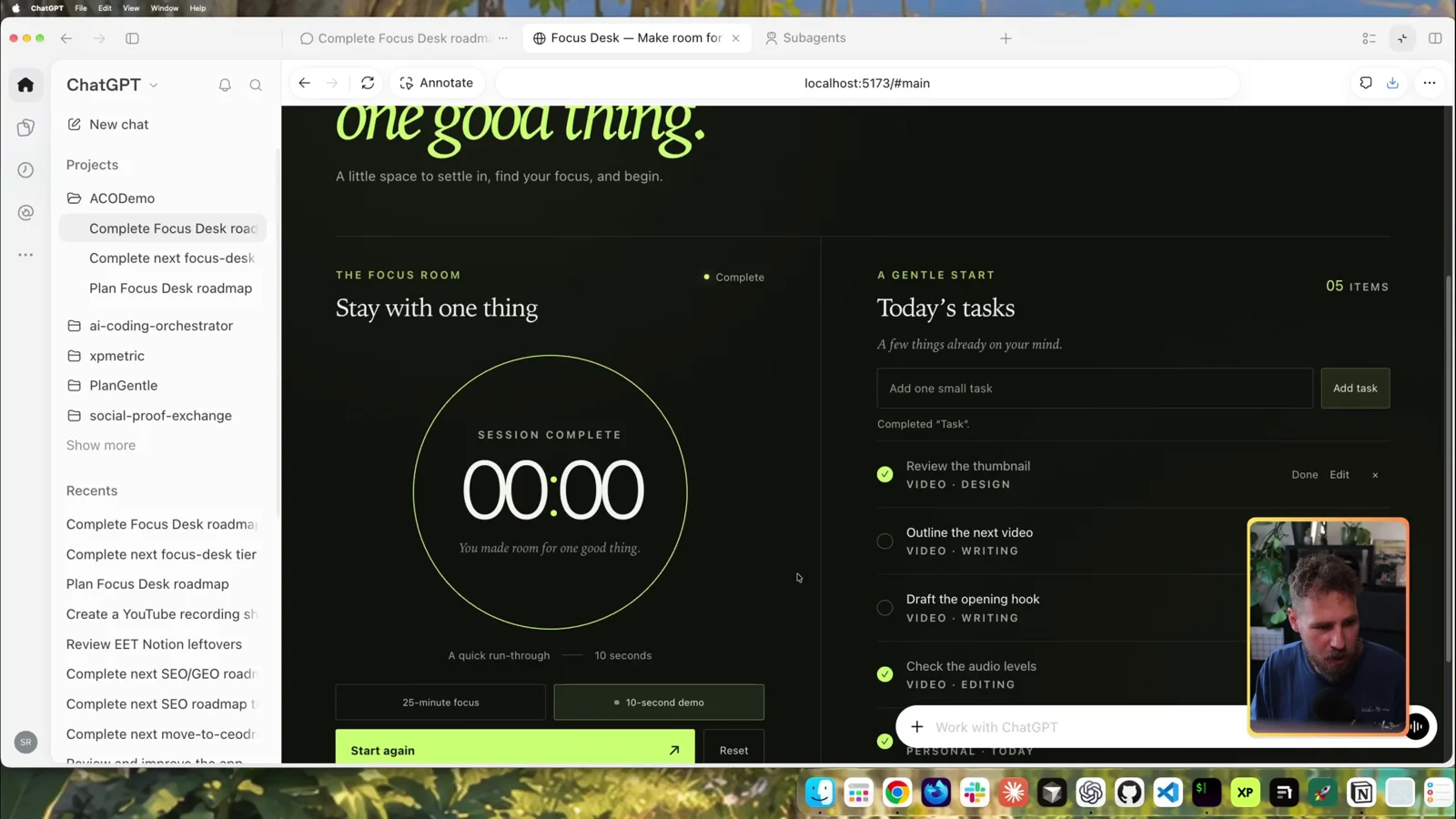
Focus Desk does what the prompt asked for: a timer, tasks you can add, edit and finish, a 10-second demo mode with a completion animation, and a working reset.
Gotchas
- “Are you on the right model?” Agents sometimes can’t see their own model or effort and stop to ask. That’s why the profile says missing visibility isn’t a mismatch.
- No Git remote = a question. In an empty local repo the agent asks where the PR should go. Answer once (“local, merge into main”), or put it in the project’s rules.
- MCP overhead is real. If your roadmap tool’s MCP server returns lots of formatting, you pay for it on every call. That was our main reason for leaving Notion.
- Model names are typed by hand. The profile editor doesn’t pull official model IDs from the providers yet, so check spelling.
Related posts
- Ship Faster with ChatGPT Codex + Claude Code (My Git Automation)
- How to Run Claude Code on a VPS: for keeping an agent working around the clock
- Claude Custom Instructions: The 10-Line File That Kills Walls of Text
- Official docs: Model Context Protocol
Your turn
The orchestrator is private for now. If you want to use it, tell me in the YouTube comments or on X @StefanRows. If enough people want it, I’ll figure out a way to release it.
And I’d like to know: what does your AI coding workflow look like?